Homepage Architecture
https://github.com/ForeverHYX/Homepage
This is the technical companion to the code at https://github.com/ForeverHYX/Homepage. It documents how the site is put together as it runs today, after the migration from a hybrid Next.js + FastAPI stack to a single-process FastAPI + Jinja2 + vanilla JS stack.
If you read an older version of this article, please disregard the Next.js
App Router, React Server Components, unstable_cache, hydration, and SSR
sections — none of that is in production anymore. The old frontend/
directory is preserved in git history, but it is not deployed.
TL;DR
- One process. gunicorn runs 1 uvicorn worker, hosting the same FastAPI app.
- FastAPI serves HTML pages (rendered server-side with Jinja2) and JSON APIs out of the same codebase.
- The browser receives fully-rendered HTML; interactivity is layered on by
small vanilla JS modules loaded with
<script defer>. - No database. Markdown files in
content/are the sole data source, with mtime-based in-memory caching. - Deployed on a 2-core / 1.7 GB Debian 12 VPS behind Nginx.
- Page TTFB is 17–27 ms; static assets are served directly by Nginx in 18–25 ms.
Architecture Evolution — Why We Removed Next.js
This section is the single most important context for understanding the current shape of the codebase. The migration was not aesthetic — it was a direct response to measurable inefficiencies on a small server.
The original Next.js + FastAPI split
The first production version of this site was a textbook "modern web" split:
- Next.js 16 (App Router, React 19, TypeScript) served the public-facing
pages —
/,/articles,/articles/[slug],/gallery,/resume. - FastAPI ran behind it and served everything else: the content APIs
(
/api/site/*), the search index, the admin dashboard (/upload,/login), file upload/delete APIs, and/static/*+/uploads/*.
The rationale was the usual one: server-side rendering for SEO and fast first paint, the React component ecosystem for the UI, and a clean separation between the "frontend" and the "backend."
The reality on a 2-core / 1.7 GB server
In practice, almost none of those benefits materialized:
-
Next.js was a ~150 MB RAM proxy. Nearly every component was marked
"use client", so React Server Components gave us almost no real server rendering. The Next.js process existed mainly to call FastAPI's JSON endpoints and re-serialize the result into HTML. We were paying ~150 MB of resident memory for a glorified fetch-and-render loop. -
Double proxy hop. Every request did
Browser → Nginx → Next.js (Node) → FastAPI → back through the same chain. That extra hop added latency on every single page view. Measured TTFB with Next.js in the path was ~80–120 ms. -
Build-step friction. Every code change — even a one-line CSS tweak — required a 2–4 minute
npm run buildbefore it was live. Iteration speed during content work and visual tuning was painful. -
Client-side runtime cost for no real benefit. The Next.js runtime shipped ~70 KB+ of JS to the client purely for hydration of components that were already interactive on their own (nav, search, theme toggle, gallery carousel). Users were downloading, parsing, and executing a hydration framework so that React could attach event listeners that vanilla JS could attach in a few lines.
The migration decision
We removed Next.js entirely. FastAPI now renders HTML directly through
Jinja2 templates, and all interactivity is small vanilla JS modules. The
old frontend/ directory was removed from the runtime repo; git history
still preserves it for historical diffing, but it is not part of the
deployment.
Measurable wins after the migration
| Metric | Before (Next.js + FastAPI) | After (FastAPI + Jinja2) | Delta |
|---|---|---|---|
| Resident memory used | ~556 MB | ~452 MB | −104 MB (~130 MB freed from removing Next.js) |
| Available memory | ~1.1 GB | ~1.3 GB | +200 MB headroom |
| Page TTFB (all routes) | ~80–120 ms | 17–27 ms | ~4× faster |
| Static asset latency | (mixed) | 18–25 ms (Nginx direct) | — |
| Long-running processes | Next.js node + 2 gunicorn + nginx | 1 gunicorn + nginx | fewer runtime processes |
| Frontend build step | 2–4 min npm run build |
none | edit-and-refresh |
| Client JS shipped for hydration | ~70 KB+ framework runtime | 0 (vanilla, defer-loaded) | — |
The headline number is the TTFB drop from ~80–120 ms to 17–27 ms. That is the cost of removing an entire process and an entire network hop from the hot path of every page load.
System Architecture
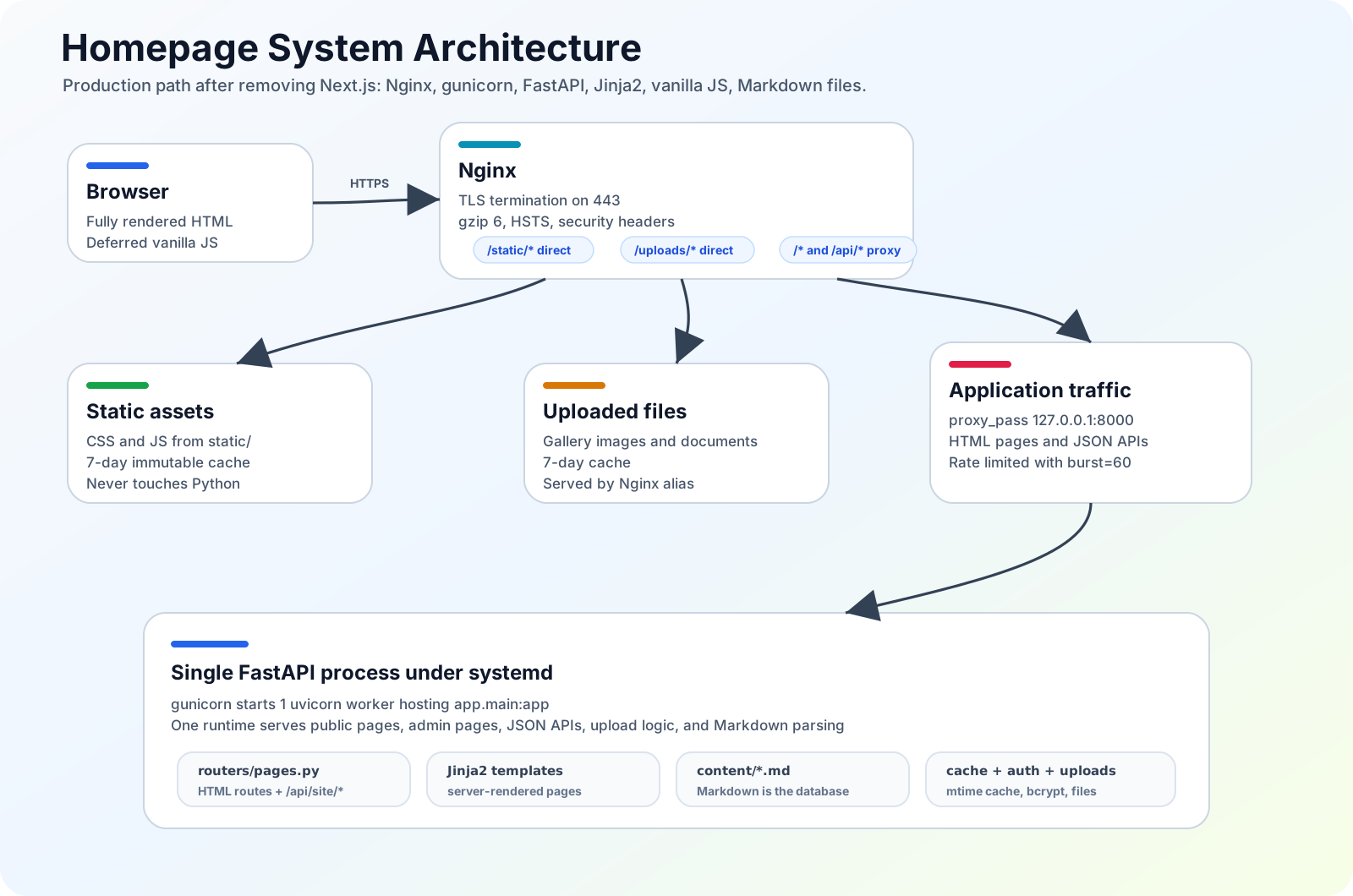
Production routing after the migration: Nginx serves static and upload assets directly, while HTML pages and JSON APIs share the same FastAPI process.
The entire site is one FastAPI application running under gunicorn
with 1 uvicorn worker. Nginx terminates TLS, serves static assets
directly (so they never touch Python), and proxies everything else to
FastAPI on 127.0.0.1:8000.
Request flow (end to end)
1. Browser requests  https://foreverhyx.com/articles
2. Nginx (443, TLS) matches location /*  →  proxy_pass http://127.0.0.1:8000
3. gunicorn hands the request to the uvicorn worker
4. FastAPI router (routers/pages.py) matches /articles
5. Page handler:
     a. reads + parses content/articles/*.md   (mtime-cached)
     b. builds the page payload (articles list, tags, news)
     c. Jinja2 renders articles.html  →  full HTML string
6. FastAPI returns text/html to Nginx → browser
7. Browser parses HTML, encounters <script defer src="/static/js/...">
     → fetches JS (served directly by Nginx, 7-day immutable cache)
8. Deferred JS runs after DOM parse: nav island, search, theme toggle,
     liquid-glass, lightfield, content enhancer, gallery, etc.
The key contrast with the old architecture: there is no second process and no JSON round-trip in the critical path of the initial HTML. The server hands the browser a finished page; the browser then enhances it with vanilla JS.
Project Structure
app/
├── main.py                 # FastAPI app + Jinja2Templates
├── config.py               # Paths, rate limiter, env
├── auth.py                 # bcrypt + session tokens
├── cache.py                # mtime-based in-memory cache
├── articles.py             # Article parsing
├── news.py                 # News aggregation (manual + articles + gallery)
├── content_utils.py        # Section extraction, about parsing
├── markdown_utils.py       # Markdown renderer (with PDF embed extension)
├── education.py            # Education timeline parser
├── file_utils.py           # Image conversion, safe path join
├── gallery_utils.py        # Gallery config
├── routers/
│   ├── pages.py            # HTML page routes + JSON API + payload builders
│   ├── upload.py           # File upload APIs
│   └── auth.py             # Login API
└── templates/
    ├── base.html           # Layout: nav island, lightfield, footer, scripts
    └── pages/              # home, articles, article_detail, gallery,
                            # resume, login, upload, 404

static/
├── css/styles.css          # Single stylesheet (~3400 lines)
└── js/
    ├── effects/
    │   ├── liquid-glass.js  # SVG feDisplacementMap glass effect (from .ts)
    │   └── lightfield.js    # Animated gradient blobs (from .ts)
    └── components/
        ├── site-header.js       # Nav island, search, theme toggle, mobile menu
        ├── content-enhancer.js  # Code highlighting + GitHub cards
        ├── gallery-view.js      # Carousel + lightbox
        ├── upload-manager.js    # Drag-drop upload dashboard
        ├── anniversary-calendar.js  # Anniversary calendar widget
        └── anniversary-data.js

content/                    # Markdown content (the "database")
├── about.md, content.md, news.md
└── articles/*.md

uploads/                    # Gallery + avatar + documents
deploy/
└── nginx-foreverhyx.conf   # Saved nginx config
The legacy Next.js source is no longer present in the runtime tree. Git history remains the reference if you need to inspect the old migration path.
Backend
Module responsibilities
| Module | Responsibility |
|---|---|
app/main.py |
FastAPI app construction, Jinja2Templates setup, router registration |
app/config.py |
Path resolution, slowapi limiter, environment variables |
app/auth.py |
bcrypt password hashing, session token issue/verify |
app/cache.py |
mtime-keyed in-memory cache (the only caching layer) |
app/articles.py |
Article front-matter + body parsing |
app/news.py |
News aggregation from manual entries, articles, and gallery |
app/content_utils.py |
Homepage section extraction, about/profile parsing |
app/markdown_utils.py |
Python-Markdown renderer + custom PdfExtension |
app/education.py |
Education timeline parser |
app/file_utils.py |
Image conversion, safe_join() path traversal protection |
app/gallery_utils.py |
Gallery config (gallery_config.json) management |
app/routers/pages.py |
All HTML page routes + /api/site/* JSON + payload builders |
app/routers/upload.py |
File upload / delete / folder / gallery-toggle APIs |
app/routers/auth.py |
Login API |
Markdown is the database
There is no database. The site is entirely file-driven:
content/about.md— profile info (name, role, email, GitHub, location)content/content.md— main homepage sectionscontent/news.md— manual news entriescontent/articles/*.md— one file per article; the parser extracts title, date, author, tags, and abstract/summary from front-matteruploads/<album>/— one directory per gallery album, with an optionalmeta.json(title, description, date, author)gallery_config.json— controls which upload folders are publicly exposed as gallery albumsuploads/avatar.png,uploads/transcript.pdf— misc assets
Because the data layer is the filesystem, content edits are deployed by simply editing a file — no migration, no admin UI required (though one exists for uploads).
Caching: mtime-keyed in-memory
The only caching layer is a small in-memory cache keyed by (path, mtime). The logic is deliberately simple:
- Before reading/parsing a file, check the cache for
(path, current_mtime). - If it hits, return the parsed object.
- If it misses (or the file's mtime changed since it was cached), re-read, re-parse, and store under the new key.
This means editing a Markdown file invalidates exactly that file's cache
entry on the next request — no manual busting, no deploy hook, no
revalidateTag. Gallery toggles and uploads likewise update the underlying
file/config, and the next read picks up the change automatically.
Markdown rendering
Rendering uses Python-Markdown with a curated extension set:
fenced_code— triple-backtick code blockstables— GFM-style tablestoc— automatic table-of-contents generation for articles- a custom
PdfExtension— rewritesimage syntax into an<embed>tag, so PDFs can be inlined in articles just like images
Auth and sessions
Admin features (/upload, file/gallery APIs) are gated by a deliberately
simple session system:
- Passwords hashed with bcrypt.
- On successful login, a session token is minted with
secrets.token_urlsafe(32). - Tokens are stored in
.sessions.jsonwith a 24-hour validity. - Token comparison uses
secrets.compare_digestto be constant-time and resistant to timing attacks. .sessions.jsonis a plain file on disk, which is fine for a single-host deployment. If you need horizontal scale, swap in a real session store.
Rate limiting
slowapi provides rate limiting at the FastAPI layer:
- 200 / min global default
- 10 / min on
/login(brute-force protection) - 30 / min on
/uploadand the file-management APIs
Filesystem safety
Every path that derives from user input (upload filenames, gallery folder
names, served static paths) passes through safe_join() to prevent path
traversal outside the allowed roots.
Image pipeline
On upload, images are normalized:
- JPG → WebP auto-conversion at quality 80
- Max dimension 1920 px (longer side), preserving aspect ratio
- Handled by Pillow inside
app/file_utils.py
Frontend — Jinja2 Templates + Vanilla JS
This is the section that changed the most in the migration. There is no React, no Next.js App Router, no SSR/hydration split. Instead:
Template inheritance
Jinja2 templates live in app/templates/. base.html defines the site
shell — <head>, the floating nav island, the lightfield container, the
liquid-glass layer, the footer, and the <script defer> tags — and each
page extends it:
base.html
  ├── pages/home.html
  ├── pages/articles.html
  ├── pages/article_detail.html
  ├── pages/gallery.html
  ├── pages/resume.html
  ├── pages/login.html
  ├── pages/upload.html
  └── pages/404.html
Page handlers in routers/pages.py build a payload dict (articles,
tags, news, gallery config, profile, education timeline, etc.) and pass it
to Jinja2Templates.TemplateResponse. The server returns fully-formed
HTML; the browser never waits for a client-side fetch to populate primary
content.
Vanilla JS components
All interactivity is plain JS, organized as small modules under
static/js/ and loaded with <script defer> so they run after the DOM is
parsed but never block rendering:
| Module | Role |
|---|---|
effects/liquid-glass.js |
SVG feDisplacementMap glass effect engine |
effects/lightfield.js |
Animated gradient light spots with mouse parallax |
components/site-header.js |
Nav island, search dropdown, theme toggle, mobile menu |
components/content-enhancer.js |
Code syntax highlighting + GitHub link cards |
components/gallery-view.js |
Carousel + lightbox |
components/upload-manager.js |
Drag-and-drop upload dashboard (admin) |
components/anniversary-calendar.js |
Anniversary calendar widget |
components/anniversary-data.js |
Data for the anniversary widget |
How interactivity works without React
There is no virtual DOM, no hydration, no state library. Each component is a self-contained module that:
- Queries the DOM for its elements (the server already rendered them).
- Attaches event listeners directly.
- Mutates the DOM directly in response to user input.
For data that isn't in the initial HTML (e.g. live search results, async
gallery toggles), the component does a fetch() to a /api/site/* JSON
endpoint. This is the same FastAPI app — JSON APIs and HTML pages live in
the same process, behind the same router file (routers/pages.py).
The net effect: the browser receives a complete page, then a handful of small deferred scripts enhance it. No framework runtime, no hydration phase, no second process.
TS → JS via esbuild
The two effect engines (liquid-glass.js, lightfield.js) were originally
written in TypeScript. They are transpiled to plain JS with esbuild as
a one-off build step (not part of the deployment — the committed .js
files are what's served). esbuild was chosen specifically because it adds
no runtime framework dependency: the output is plain JS that runs on
its own. There is no React, no runtime, no client-side bundle beyond the
literal files in static/js/.
Visual Effect Engines
The two signature visual effects survived the migration unchanged in behavior, but they are now plain vanilla JS rather than React components.
liquid-glass.js
An ~880-line SVG filter engine that produces a real refractive "glass"
effect using feDisplacementMap:
- Displacement maps are generated on a
<canvas>from a rounded-rectangle SDF (signed distance field), so the glass refracts correctly along rounded corners. - Chromatic aberration is achieved by applying different displacement scales per color channel.
- The effect activates based on mouse proximity — it intensifies as the cursor approaches a glass element.
- On Windows, an older version produced black shadow artifacts. This
was fixed by tightening the SVG filter region from
-35%/170%to-2%/104%and adding anfeCompositewithSourceAlphato clip the output. Without the tighter region, Windows' SVG rasterizer bled opaque black outside the filter bounds; the composite clip ensures only the in-region, in-alpha pixels survive. - On mobile, the site falls back to a standard frosted-glass CSS effect for performance.
lightfield.js
Six animated gradient "light spots" drift behind the page content:
- Positioned and animated with
requestAnimationFrame. - Lerp smoothing keeps motion fluid without being jittery.
- Mouse parallax shifts the field subtly with cursor movement.
- Palettes are theme-adaptive — they read the current
data-themeand adjust. - Pauses on
visibilitychange(tab hidden) and respectsprefers-reduced-motion.
Data Flow
A single request, end to end:
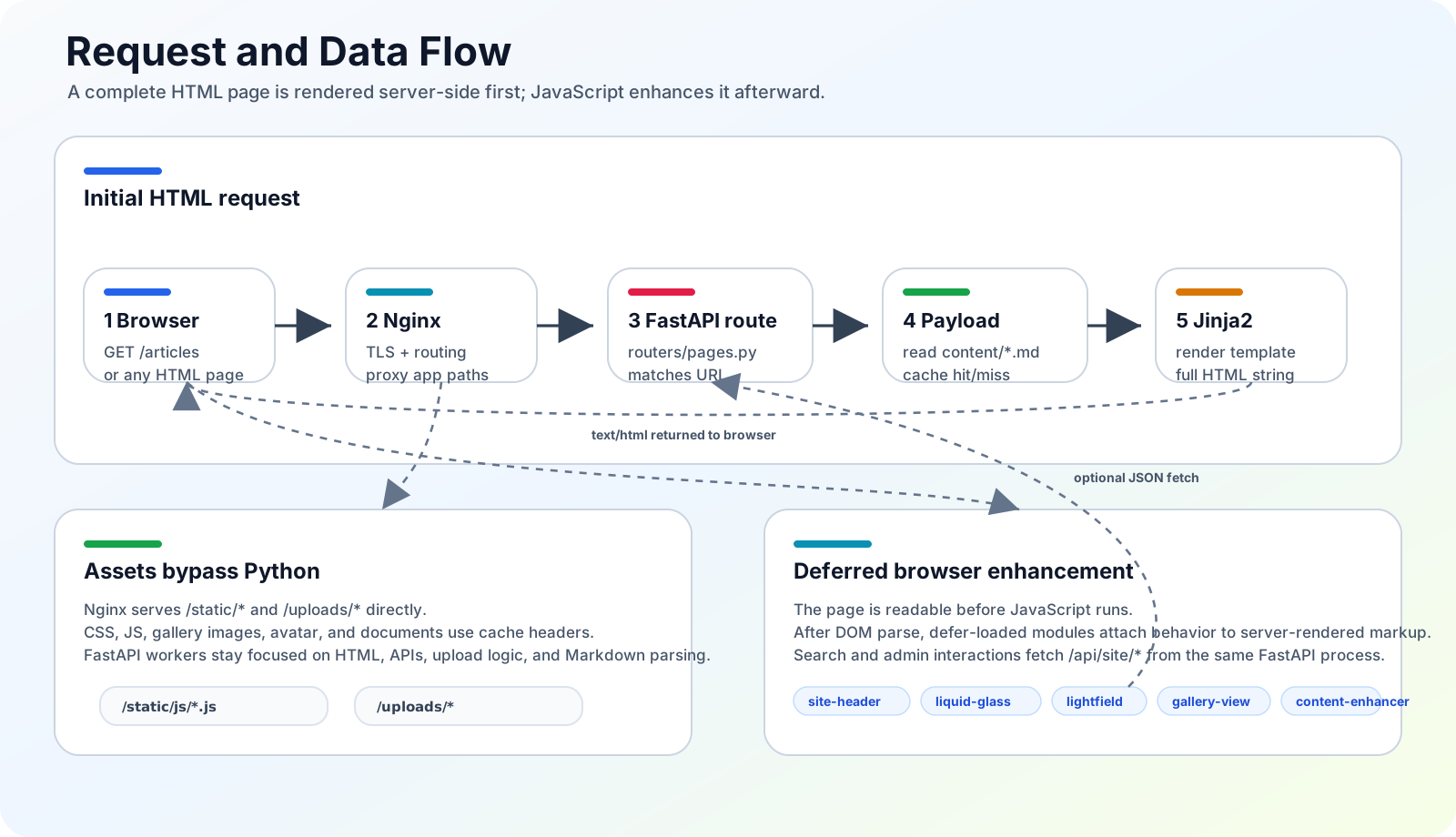
Initial HTML is rendered by FastAPI/Jinja2 from Markdown content; deferred vanilla JS enhances the page afterward.
The important property: the initial HTML is complete and correct without any JavaScript. JS only enhances. This is why TTFB is the dominant performance metric — once FastAPI returns the rendered HTML, the user sees content immediately, and the deferred scripts layer on interactivity without blocking.
Deployment
One systemd service
There is exactly one service to manage. The systemd unit
/etc/systemd/system/foreverhyx-homepage.service runs gunicorn, which in
turn manages the uvicorn workers:
[Service]
ExecStart=/root/newhomepage/.venv/bin/gunicorn app.main:app \
    -k uvicorn.workers.UvicornWorker \
    --bind 127.0.0.1:8000 \
    --workers 1 \
    --timeout 60
There is no Next.js process, no npm run build, no Node runtime in
production. A deploy is: pull the code, restart the service.
sudo systemctl restart foreverhyx-homepage
Nginx
Nginx terminates TLS and dispatches by path:
| Location | Action |
|---|---|
/static/* |
alias to /root/newhomepage/static/, 7-day cache, immutable |
/uploads/* |
alias to /root/newhomepage/uploads/, 7-day cache |
/api/* |
proxy_pass to 127.0.0.1:8000, rate-limited, burst=60 |
/* |
proxy_pass to 127.0.0.1:8000 (all HTML pages) |
Other Nginx settings: gzip level 6, TLS 1.2 / 1.3, HSTS, and a
standard set of security headers. The reference config is checked into the
repo at deploy/nginx-foreverhyx.conf.
Because /static/* and /uploads/* never touch Python, they are served
in ~18–25 ms regardless of FastAPI load.
Local development
There is no frontend build step. Static JS is served directly by FastAPI in dev mode:
python -m venv .venv
source .venv/bin/activate
pip install -r requirements.txt
uvicorn app.main:app --reload --host 127.0.0.1 --port 8000
Then open http://127.0.0.1:8000. Edit a .py, .html, .css, or .js
file and refresh. During CSS/JS iteration, append ?v=N to a static asset
URL to bust the browser cache.
Performance Summary
These numbers are measured on the production 2-core / 1.7 GB Debian 12 box, after migration:
| Metric | Value |
|---|---|
| Page TTFB (all routes) | 17–27 ms |
| Static asset latency (Nginx direct) | 18–25 ms |
| Resident memory used | ~452 MB (was ~556 MB before migration) |
| Memory freed by removing Next.js | ~130 MB |
| Available memory | ~1.3 GB (was ~1.1 GB) |
| Long-running processes | 1 gunicorn worker + nginx |
| Frontend build step | none |
The TTFB improvement — from ~80–120 ms to 17–27 ms — is the headline result of the migration. It comes from collapsing two processes (Next.js + FastAPI) into one (FastAPI), eliminating the internal proxy hop, and serving finished HTML directly from Jinja2.
Content Model Recap
content/about.md— profile infocontent/content.md— homepage sectionscontent/news.md— manual news entriescontent/articles/*.md— one file per article (front-matter: title, date, author, tags, abstract/summary)uploads/<album>/— gallery album images + optionalmeta.jsongallery_config.json— which upload folders are public albumsuploads/avatar.png,uploads/transcript.pdf— misc assets
Editing any of these files is a live deploy — the mtime cache picks up the change on the next request.
Environment Variables
HOMEPAGE_UPLOAD_USER=admin
HOMEPAGE_UPLOAD_PASS=change-me
HOMEPAGE_UPLOAD_PASS_HASH=<bcrypt hash>   # alternative to plain pass
HOMEPAGE_CONTENT_DIR=/path/to/content      # optional override
HOMEPAGE_UPLOAD_DIR=/path/to/uploads       # optional override
HOMEPAGE_COOKIE_SECURE=true                # production HTTPS
Notes for Contributors
- No build step. Edit static files and refresh. There is no bundler,
no transpiler in the deploy path. (esbuild is used only for the one-off
TS→JS conversion of the two effect engines; the committed
.jsfiles are what's served.) - Cache-bust with
?v=N. Append a query param when iterating on CSS/JS during development. static/css/styles.cssis the single source of truth for styling — one ~3400-line stylesheet powers the entire site.- Sessions are stored in
.sessions.json. This is intentionally simple (token_urlsafe(32)+ bcrypt); replace it with a real session store if you scale beyond one host. - Rate limiting is
slowapi: 200/min global, 10/min login, 30/min upload. - All filesystem access uses
safe_join()to prevent path traversal. - Windows SVG filter regions must be tight (
-2%/104%with anfeCompositeSourceAlpha clip) for the liquid-glass effect — the older-35%/170%region produced black shadow artifacts on Windows. - No legacy frontend source is deployed. Git history is the reference for the old Next.js implementation.
Summary
The current architecture is intentionally boring and intentionally small: one FastAPI app, Jinja2 templates, vanilla JS, Markdown files, mtime caching, gunicorn + Nginx, systemd. The previous Next.js layer was removed because on a 2-core / 1.7 GB server it cost ~150 MB of RAM and ~60–100 ms of TTFB to act as a proxy in front of the very same FastAPI app. Removing it freed memory, cut TTFB roughly fourfold, and eliminated the frontend build step — without sacrificing any of the visual effects or interactivity, which now run as plain deferred scripts.